 TVC Helium 2026.2.0
<Field usesBusinessObject="false">
...
</Field>TVC Helium 2026.2.0 Release Information
07 May 2026
Table of Contents
1. Form
1.1. Relationship attribute field
Helium supports creating an object and connecting it to an existing object using form configuration. Form fields can be configured to capture object attribute values during this process.
This release introduces support for relationship attribute fields in forms. This allows users to specify relationship attribute values when an object is created and connected through form submission.
The usesBusinessObject attribute on the Field element determines whether the field refers to a business object attribute or a relationship attribute.
Valid values are:
-
true— The field expression is interpreted as a business object selectable (default behavior). -
false— The field expression is interpreted as a relationship selectable.
Example:
A Create and Connect form with relationship attribute fields can be configured as shown below:
<Form>
    <Title>Create and Connect Part</Title>
    <Section>
        <Label>Relationship Attribute</Label>
        <Field usesBusinessObject="false">
            <Label>Notes</Label>
            <Expression>attribute[Notes]</Expression>
            <Editable>true</Editable>
        </Field>
        <Field usesBusinessObject="false">
            <Label>Usage</Label>
            <Expression>attribute[Usage]</Expression>
            <Editable>true</Editable>
        </Field>
    </Section>
</Form>
Read more about Form for more details.
2. Grid Browser
2.1. Multi Sort
Grid Browser now supports multi-column sorting, allowing users to sort data by up to three columns simultaneously with independent sort directions (ascending or descending). The sort configuration can optionally be saved for future sessions.
This command can be configured in the grid browser toolbar as below:
<Toolbar>
    ...
    <AdvanceSorting />
    ...
</Toolbar>
Figure 1. Grid Browser Multi Sort
Read the Grid Browser toolbar documentation for more details.
2.2. Data Filter - Multiple column filters
The Data Filter in Grid Browser has been enhanced to support multiple column filters. Users can now add multiple filter rows, each targeting a specific column or any field, with different operators. Filters can be combined with different options to refine search results across the grid data.
Read the Grid Browser toolbar documentation for more details.
3. Table
3.1. UIPTable
This release enhanced the UIP table by adding support for built-in <TableConfigurator /> toolbar command.
This command allows adding, updating and removing user defined tables.
Also, now end user can maintain their column configuration for different tables.
This command can be configured in UIP table toolbar as below:
<Toolbar>
    ...
    <TableConfigurator />
    ...
</Toolbar>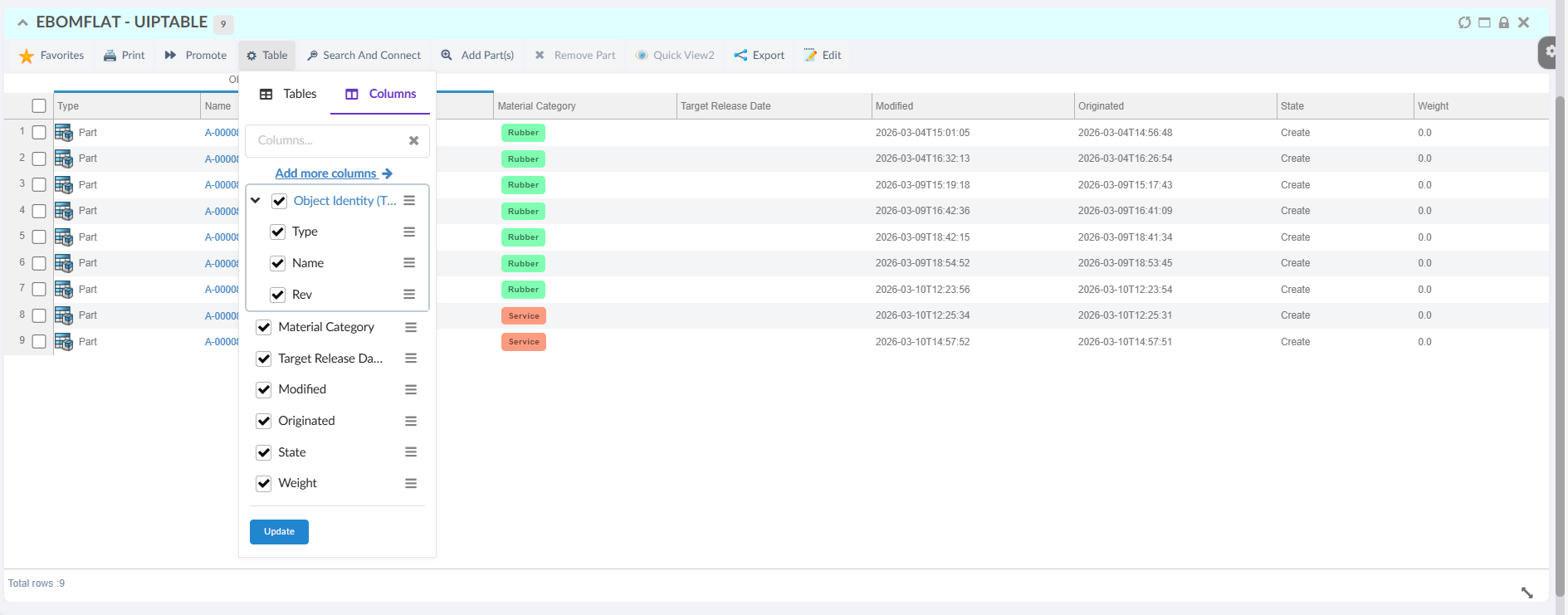
Figure 2. UIP Table TableConfigurator
Read the Table Configurator for more details.
3.2. Scroll position reset on pagination
In a datatable widget, the rows are rendered inside a scrollable content area. When a table contains many rows or columns, users typically scroll within this widget area to view data.
During pagination, users can move to next or previous result pages while still being scrolled somewhere in the current page. Helium can now reset this widget content scroll position to the top so each new page starts from the first visible rows.
Enable this behavior globally by setting the following property in tvc.properties:
tvc.helium.datatable.scroll.enableScrollTopReset=true
Default value is false.
Read more about Table Config for more details.
4. Helium True Widget
4.1. Search Action with Search Link
This release extends the search functionality by introducing two additional actions, download and openAndDownload allowing users to download files directly or open an object and download its associated file in a single action.
| Search Action | Description |
|---|---|
download |
Downloads the file associated with the search result object specified in the fileName parameter. |
openAndDownload |
Opens the search result object in the widget and then downloads the file specified in the fileName parameter. |
Read more about Search Action for more details.
4.2. Open available apps
From this release onward, app visibility can be configured at the object-type level. The app can be hidden for specific object types, and any additional types requiring restriction must be explicitly configured.
<OpenWithMenu>
	<FilterApps forType="VPMReference">
	<HideApp>CATASD_AP</HideApp>
	<HideApp>ENOR3D_AP</HideApp>
	</FilterApps>
</OpenWithMenu>
Read more about Open available apps for more details.
5. In-App Designer
5.1. Configuration Admin tabs grouped by config type
Configuration Admin now separates In-App configurations into dedicated tabs by config type instead of mixing them in a single view. This makes it easier for Config Admin users to find and manage page, dashboard, widget, dataset, table, column, and chart configurations.
5.2. Draft and Active preview for page configurations
Helium now supports clearer draft and active handling for page configurations used in In-App Designer and TVC Classic integrations.
Config Admin users can:
-
preview the active page configuration directly from Configuration Admin
-
load a draft version of a page before publishing it
-
reference a page using a stable
CONFIG:<NUMBER>URL for the active revision -
append
-draftto preview the draft version when validating changes
Examples:
${ROOT_DIR}/goto/p/CONFIG:<NUMBER>
${ROOT_DIR}/goto/p/CONFIG:<NUMBER>-draft
This makes it easier to verify page changes before promotion while keeping the active configuration stable for end users.
5.3. Option to disable end-user widget creation
Administrators can now prevent end users from adding their own widgets to dashboards through a TVC setting.
Use the following setting in tvc.properties:
tvc.core.inappdesigner.addEndUserWidgets.enabled = false
When disabled, Helium hides the add-widget entry points for end-user dashboards while still allowing widget handling where draft admin configuration flows require it.